Bridging tokens between Etherlink EVM and other EVM networks
The Etherlink EVM bridge is a web application that allows you to transfer wrapped tokens between Etherlink EVM and several other EVM-compatible blockchain networks.
The EVM bridge supports connections from Etherlink EVM to these networks:
- Ethereum
- Avalanche C-Chain
- Arbitrum One
- Optimism
- Base
- BNB Chain
It allows users to transfer several wrapped tokens, including:
- USDT
- USDC
- WBTC
- WETH
- WAVAX
- WBNB
- SHIB
For the Etherlink EVM addresses of these tokens, see Token addresses.
Etherlink EVM's LayerZero bridge infrastructure also supports a number of tokens that meet their Omnichain Fungible Token (OFT) standard. The token addresses for OFTs that can be transferred between Etherlink EVM and other networks (including WXTZ) can be retrieved from the LayerZero API, or are listed here.
Bridge security
The bridge uses the decentralized smart contracts of LayerZero that are deployed on the supported EVM networks without the intervention of a third party. It also relies on the EVM node and sequencer operators that secure Etherlink itself; these operators are listed in Network operators.
Using the EVM bridge
For a video walkthrough of the bridge, see this video.
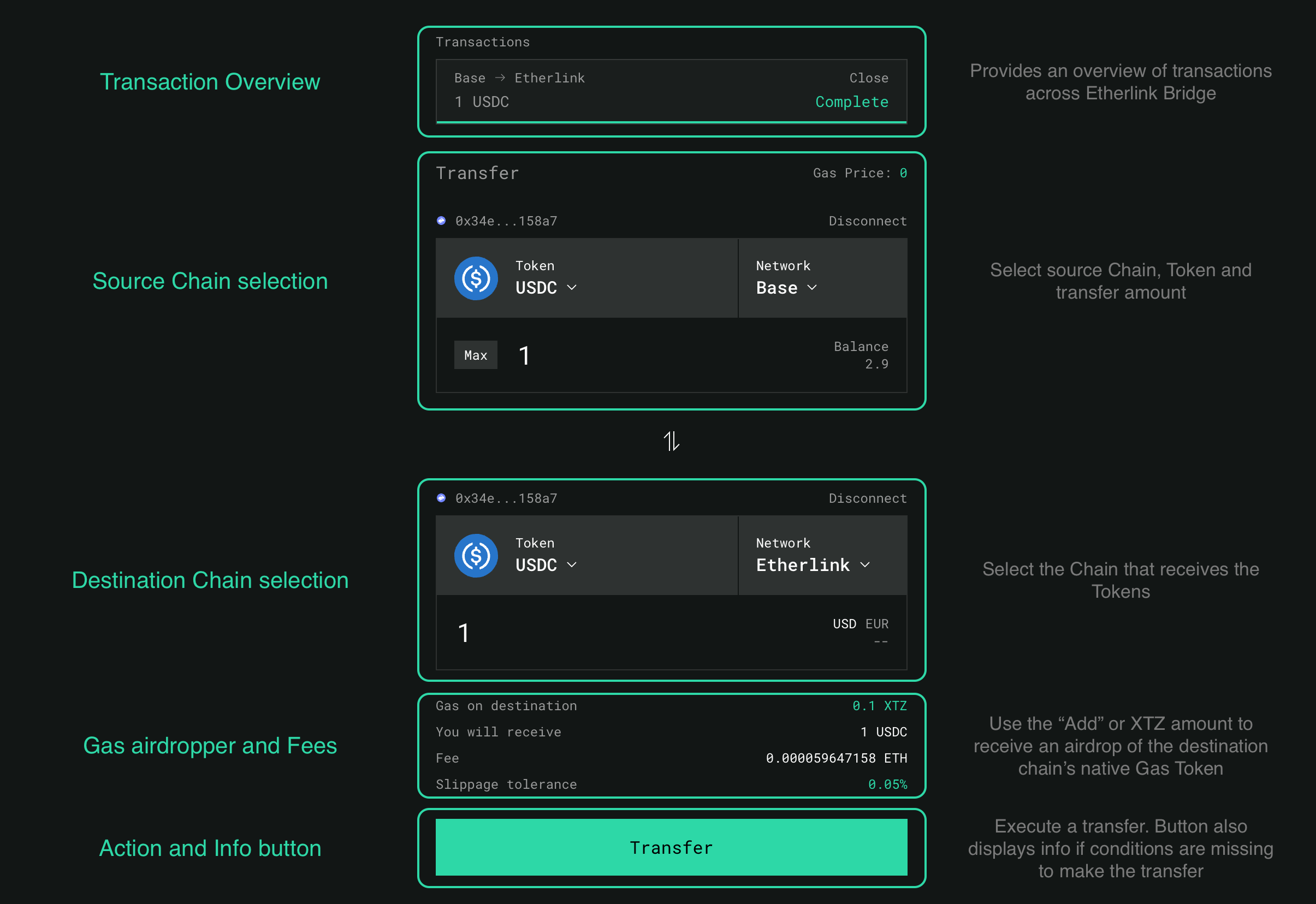
-
Go to the Etherlink EVM bridge at https://bridge.etherlink.com/evm.
-
Click the Connect button and connect your EVM wallet.
-
Select the source network from which to bridge tokens to Etherlink EVM, or select Etherlink EVM as the source network to bridge tokens out of Etherlink EVM.
-
Next to the source network, click the source token and select the token to transfer from the source network. The interface shows all bridgeable tokens across all available networks and your token balances.
-
Enter the number of tokens to bridge out of the source network.
-
Select the target network and token.
The page shows the amount of tokens that you will receive on the target chain and the fees for the token transfer in the native gas token of the source chain.
You must ensure that you have enough tokens on the source chain to pay the fees.
-
Set the other parameters for the transfer, including the Gas on destination and Slippage tolerance fields.
Interacting with Etherlink EVM requires XTZ (its native token) to pay for gas fees. As part of your bridging transaction, you can choose to send up to 0.1 XTZ to your Etherlink EVM wallet address to pay for fees for later transactions and interact with the Etherlink EVM ecosystem. The cost of this XTZ is added to the fees that you pay for the transfer. By default, the bridge adds 0.1 XTZ if the destination account has no XTZ.
-
To make the transfer, click Transfer and confirm the transfer in your wallet.
The bridge shows a popup with a link to LayerZero Scan where you can observe the progress of the bridge transaction and see an estimated time to completion. When the status changes to "completed" (or "delivered") the tokens are in your EVM account. If you don't see the tokens, you may need to import the token into your wallet on the destination network. For that, in the LayerZero page for your transaction, note the address of the "Destination Omnichain Application". Then in your Temple wallet:
- Enable the target chain if needed, from the wallet Settings, section Networks.
- Click on the Settings icon right above the list of tokens you own, then choose "Add token" and enter the token address you noted.
Troubleshooting
The transfer button can show these errors:
-
Insufficient Balance
You entered a higher amount of tokens than you hold in your account. Reduce the amount you want to transfer or add more tokens to your wallet.
-
Not Enough Native for Gas
You must own more gas on the source chain to pay the required fees. Send more of the source chain's native gas token to your wallet.
-
Select Different Chain
The source and destination chains are not compatible. This bridge is for moving tokens in and out of Etherlink EVM, not for moving tokens between other networks.
-
Transfer Cap Reached
The bridge cannot transfer the amount of tokens that you have selected. Select a smaller amount to transfer.
This error can occur for bridgeable tokens that exist on multiple networks (ETH/WETH, USDT and USDC). For example, if the bridge contract on Avalanche has 100 USDT, you can transfer no more than 100 USDT from Etherlink EVM to Avalanche.
For further support, visit the LayerZero Discord.
If you have general questions about Etherlink, we welcome you to join the Etherlink Discord Community.
Token addresses
Not all Etherlink EVM tokens can be bridged to and from other chains. See the bridge UI for the tokens that the bridge supports for each chain.
Etherlink EVM
This table shows the Etherlink EVM address of some of the tokens you can bridge between Etherlink EVM and certain other chains:
| Symbol | Name | Mainnet address |
|---|---|---|
| USDC | USD Coin | |
| USDT | Tether USD | |
| WBTC | Wrapped BTC | |
| WETH | Wrapped Ether | |
| WBNB | Wrapped BNB | |
| WAVAX | Wrapped AVAX | |
| SHIB | SHIBA INU |
Other networks
These tables show the addresses of the equivalent tokens on other networks:
- Ethereum
- Artibutrum One
- Base
- Optimism
- BNB Chain
- Avalanche C-chain
| Symbol | Name | Mainnet address |
|---|---|---|
| USDC | USD Coin | |
| USDT | Tether USD | |
| WBTC | Wrapped BTC | |
| WETH | Wrapped Ether | |
| SHIB | SHIBA INU |
| Name | Symbol | Mainnet address |
|---|---|---|
| USDC | USD Coin | |
| USDT | Tether USD | |
| WBTC | Wrapped BTC | |
| WETH | Wrapped Ether |
| Name | Symbol | Mainnet address |
|---|---|---|
| USDC | USD Coin | |
| WETH | Wrapped Ether |
| Name | Symbol | Mainnet address |
|---|---|---|
| USDC | USD Coin | |
| USDT | Tether USD | |
| WETH | Wrapped Ether |
| Name | Symbol | Mainnet address |
|---|---|---|
| USDC | USD Coin | |
| USDT | Tether USD | |
| WBNB | Wrapped BNB |
| Name | Symbol | Mainnet address |
|---|---|---|
| USDC | USD Coin | |
| USDT | Tether USD | |
| WAVAX | Wrapped AVAX |
How bridging wrapped assets works
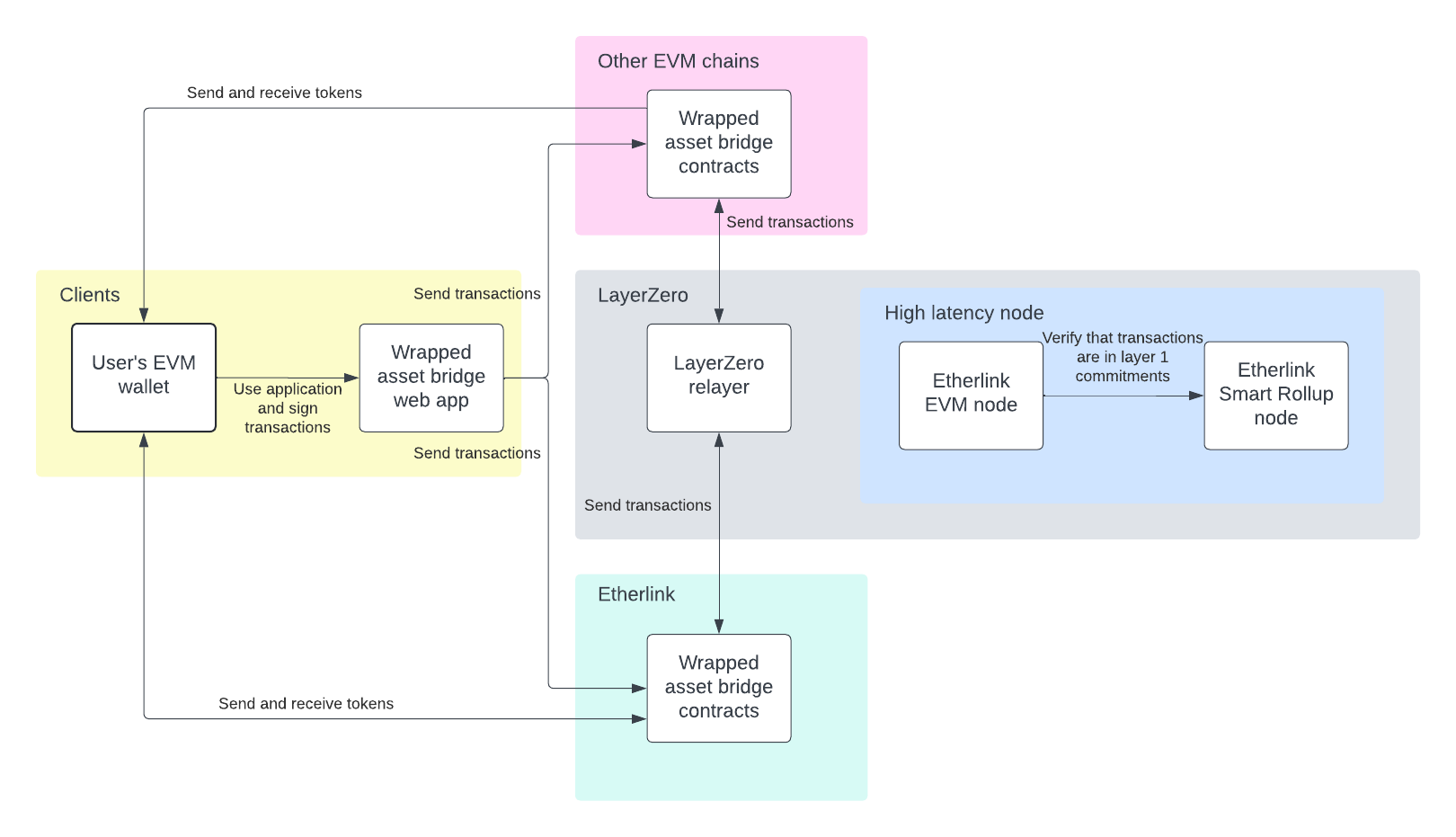
The Etherlink EVM bridge uses a wrapped asset bridge created by LayerZero. It works by maintaining liquidity pools on other networks and minting equivalent tokens on Etherlink EVM.
When you bridge tokens from other networks to Etherlink EVM, the bridge contracts lock the tokens in a liquidity pool on the source network, send a message over LayerZero's software to Etherlink EVM, and mint tokens on Etherlink EVM. When you bridge tokens out of Etherlink EVM, the contracts burn the tokens on Etherlink EVM and unlock them in the liquidity pool on the target network. Therefore, bridging tokens out of Etherlink EVM is dependent on the liquidity pool on the target chain. LayerZero also maintains EVM nodes to verify that the transactions complete on Etherlink EVM.
This diagram shows how the EVM bridge works:
For more information, see the repository for the bridge: https://github.com/LayerZero-Labs/wrapped-asset-bridge.
Bridge contract addresses
The verified contract code, ABI and historic transactions for the wrapped asset bridge on each supported network can be viewed at the following links. Developers can integrate these contracts into their own cross-chain bridge if required.
| Network | Mainnet contract address |
|---|---|
| Etherlink EVM | |
| Ethereum | |
| Arbitrum One | |
| Base | |
| Optimism | |
| BNB Chain | |
| Avalanche C-Chain |
LayerZero endpoints for OFTs
LayerZero uses these contracts to connect Etherlink EVM to its network for tokens that meet their Omnichain Fungible Token (OFT) standard. For more information, see Deployed Endpoints, Message Libraries, and Executors.
- Mainnet
- Shadownet
| Contract | Contract address |
|---|---|
endpointV2 | |
sendUln302 | |
receiveUln302 | |
blockedMessageLib | |
executor |
| Contract | Contract address |
|---|---|
endpointV2 | |
sendUln302 | |
receiveUln302 | |
blockedMessageLib | |
executor |
Related tools and information
- For information about pending transactions, see the LayerZero Cross Chain Explorer.
- For information about Etherlink EVM transactions, see the Etherlink EVM block explorer.
- More Information about the LayerZero protocol is available in their official documentation.
- The audit reports of the LayerZero protocol are available in this LayerZero GitHub Repository.
- To review the open source code of the EVM bridge, visit the LayerZero Github Repository.

 Page Outline